350,000 views in two weeks. Two indie developers. Zero dancing.
That is the result of a content pipeline we built almost entirely with AI. Science-themed slideshows on TikTok, each one a visual journey through a single panoramic image split into six swipeable frames. The topics range from deep-sea bioluminescence to the internal structure of neutron stars. The audience eats them up.
This post is the full technical breakdown. Every tool, every prompt, every decision, and the actual pricing behind the workflow. If you are an indie developer looking to build a content pipeline that runs on near-autopilot, this is your blueprint.
Credit where it is due. Our TikTok content machine is heavily inspired by the Viral Larry Skill from LarryBrain. The core idea is simple but powerful: turn repeatable viral formats into a system, then use automation to make the system compound. We adapted that thinking for science slideshows, added our own panorama workflow, and paired it with the builder-style distribution mindset we admire at Rockstone Inc.
Why Panoramic Slideshows Work on TikTok
The insight came from watching how people interact with TikTok slideshows. Most creators use six unrelated images. Each slide is a standalone graphic. The viewer swipes through disconnected frames and the only thread holding them together is the caption text.
Panoramas change this completely.
When you split a single ultrawide image into six sequential frames, every swipe reveals more of the same scene. The colors match. The lighting is consistent. Objects that start on the right edge of slide three continue seamlessly into the left edge of slide four. The viewer is not looking at six images. They are traveling through one.
This creates two powerful effects. First, visual curiosity. The partial reveal at each slide's edge whispers that something more is waiting. Swipe rates go up because the human brain wants to complete the picture. Second, perceived production quality. A coherent panorama looks cinematic. It signals effort and artistry, even when an AI generated it in 45 seconds.
Science topics amplify both effects. A panoramic cross-section of a volcano, with magma chambers on the left gradually transitioning to eruption plumes on the right, tells a story just through spatial progression. No narration needed. The image does the work.
The Pipeline: Four Stages
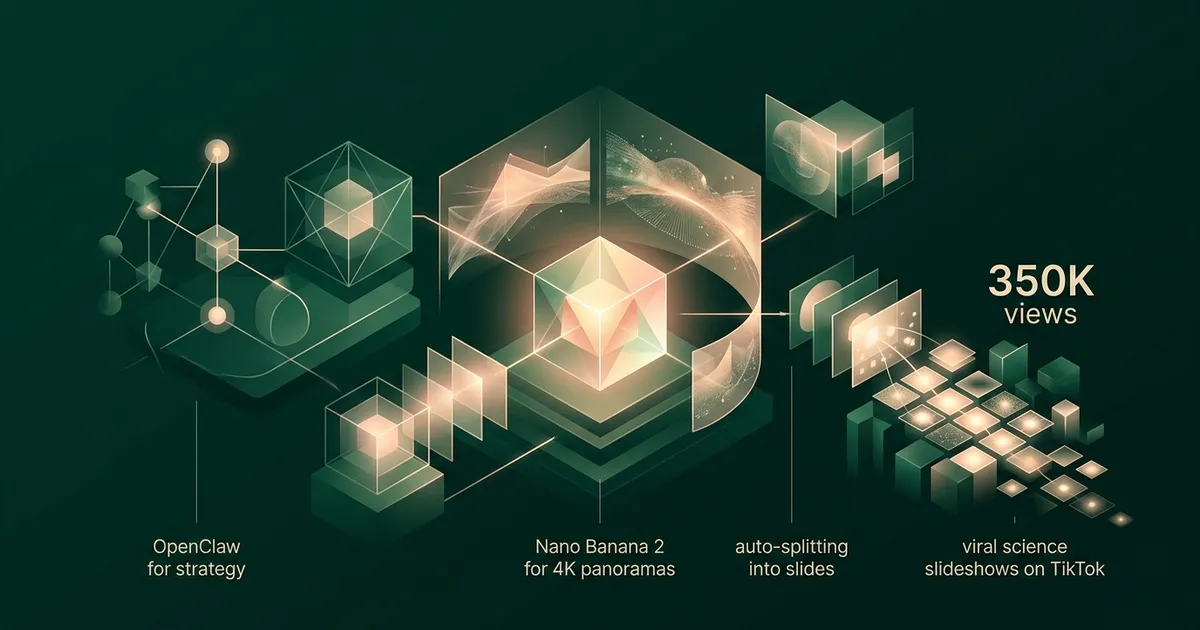
Here is the full workflow, end to end.
- OpenClaw generates the content strategy: topic selection, caption text, hashtags.
- Nano Banana 2 (Gemini-3.1-Flash-Image-Preview), not Nano Banana Pro, generates a single 4K ultrawide panoramic image.
- A splitting script divides the panorama into six equal frames.
- The frames are assembled into a TikTok slideshow with the generated captions.
Total time per slideshow: 3 to 5 minutes. We batch-produce 10 to 20 in a single session.
Stage 1: OpenClaw for Topic Research and Captions
The first problem in any content pipeline is deciding what to make. Left to our own instincts, we would pick topics that fascinate us personally: quantum field theory, topological insulators, the mathematical structure of black holes. These are terrible TikTok topics. Nobody scrolling at midnight wants a lecture on gauge symmetry.
OpenClaw solves the topic selection problem. It is an AI agent designed for marketing and content research. We feed it a brief: "Science topics that perform well as visual TikTok slideshows. Target audience: curious adults aged 18 to 35. Avoid anything that requires equations to understand. Prioritize topics with strong visual potential."
OpenClaw returns a ranked list of topics with reasoning for each. It factors in current trending topics, search volume, and visual potential. A typical batch might include:
- What the inside of a neutron star actually looks like
- The deepest point in every ocean, visualized
- How a caterpillar completely dissolves inside its cocoon
- The size of the universe at every scale
- What happens to your body in the vacuum of space
Notice the pattern. Each topic has inherent visual drama. Each one triggers curiosity without requiring specialized knowledge. Each one can be represented as a spatial journey, exactly the format our panoramic approach rewards.
After topic selection, OpenClaw writes the captions. TikTok slideshow captions need to be short, punchy, and structured so each slide gets one digestible fact. OpenClaw generates six caption segments (one per slide) plus the main post caption with hashtags. The captions are conversational, not academic. "This is what happens at 10,000 meters below sea level" hits differently than "Abyssal zone hydrostatic pressure characteristics."
What Makes Science Topics Perform on TikTok
After analyzing our top-performing posts, clear patterns emerged.
Scale comparisons dominate. Anything that puts familiar objects next to unfamiliar ones at extreme scales performs well. "The Sun compared to the largest known star" is a guaranteed performer because the human brain cannot resist the shock of relative size.
Hidden interiors fascinate. Cross-sections of planets, volcanoes, the human body, machines. People love seeing what is inside things they cannot normally open.
Process transformations hook attention. Metamorphosis, stellar evolution, erosion over millions of years. Anything that shows a before-and-after across the panorama.
Counterintuitive facts stick. "Bananas are radioactive" gets more saves than "The half-life of potassium-40." Same fact, different framing. OpenClaw is surprisingly good at finding the counterintuitive angle.
Stage 2: Nano Banana 2 for Panoramic Image Generation
This is the core of the pipeline and the part that required the most experimentation to get right.
Nano Banana 2 is the internal name for Gemini-3.1-Flash-Image-Preview, available through Google AI Studio. We use Nano Banana 2, not Nano Banana Pro, because our workflow optimizes for fast, repeatable, high-volume panorama generation rather than the highest-fidelity one-off image possible. It generates images from text prompts, and the critical capability for our workflow is that it can generate images at arbitrary aspect ratios, including the extreme 21:9 ultrawide format we need for panoramas.
Most image generation models default to square or standard widescreen ratios. Ask them for 21:9 and they either refuse, crop awkwardly, or produce distorted results. Nano Banana 2 handles it natively. The output is a true 4K ultrawide panorama, typically 4096 by 1748 pixels, with content distributed intentionally across the full width.
The Prompting Technique
Getting consistent, high-quality panoramas required developing a specific prompting structure. Generic prompts produce generic results. Here is the framework we converged on after hundreds of generations.
Every prompt follows this template:
- Format declaration. Explicitly state the aspect ratio and that this is a panoramic composition.
- Scene description with spatial anchors. Describe what appears on the left, center, and right of the panorama. This prevents the model from clustering all visual interest in the center.
- Visual continuity instruction. Explicitly tell the model that this single image will be split into six frames and each section must contain meaningful content.
- Style and mood directives. Consistent art direction across the batch.
- Technical quality markers. Resolution, lighting, detail level.
Example Prompts
Here are three real prompts from our production pipeline, lightly edited for clarity.
Topic: Cross-section of a neutron star
Ultrawide 21:9 panoramic scientific illustration. A dramatic cross-section
of a neutron star, viewed from left to right as a journey from the outer
crust to the innermost core.

Left section: the thin iron outer crust, jagged crystalline lattice
structure, glowing faintly against the black of space. Scattered magnetic
field lines arc outward.

Center-left: the inner crust, neutron-rich nuclei arranged in "nuclear
pasta" phases (spaghetti, lasagna, gnocchi shapes), rendered in luminous
blues and purples.

Center: the outer core, a sea of superfluid neutrons with scattered
protons and electrons, depicted as a dense glowing fluid in deep violet.

Center-right: the inner core, ultra-dense quark matter rendered as a
tight geometric lattice of quarks and gluons in hot orange and gold.

Right section: a mirrored view showing the star's exterior with intense
magnetic poles and relativistic jets shooting upward.

Style: hyper-detailed scientific illustration with cinematic lighting.
Dark background. Luminous, jewel-toned palette. Each section must contain
distinct visual content suitable for an individual slideshow frame.
4K resolution, sharp details throughout.
Topic: Deep ocean zones
Ultrawide 21:9 panoramic underwater scene. A vertical-to-horizontal
journey through ocean depth zones, depicted as a sweeping left-to-right
progression from sunlit surface to the deepest trench.

Left section: sunlight zone (0-200m). Bright turquoise water, coral
reefs, tropical fish, sunbeams penetrating from above. Warm, inviting
colors.

Center-left: twilight zone (200-1000m). Deepening blue, bioluminescent
jellyfish trailing long tentacles, a lone swordfish silhouette.
Fading light.

Center: midnight zone (1000-4000m). Near-total darkness. Giant squid
with bioluminescent spots. Faint blue-green glow from scattered
organisms. An anglerfish lure glowing in the void.

Center-right: abyssal zone (4000-6000m). Black water. Ghostly white
tube worms clustered around a hydrothermal vent emitting orange mineral
plumes. Eyeless shrimp.

Right section: hadal zone (6000-11000m). The Mariana Trench floor.
Absolute darkness except for sparse bioluminescence. Xenophyophores
on the sediment. A single amphipod, impossibly small against the
crushing depth.

Style: photorealistic with artistic license. Smooth color gradient
from warm surface tones to cold abyssal blacks across the full width.
Every section must work as a standalone frame. 4K resolution.
Topic: Scale of the universe
Ultrawide 21:9 panoramic cosmic illustration. A scale comparison
journey from subatomic to cosmic, flowing left to right.

Left section: quarks and atoms, rendered as glowing orbitals and
particle tracks in neon colors against pure black. A DNA helix
emerging from the atomic scale.

Center-left: human scale. A single human figure standing on Earth's
surface, city skyline behind them, mountains in the distance.
Realistic proportions, warm golden-hour lighting.

Center: planetary scale. Earth, Moon, and Mars shown in true relative
size. Thin blue atmosphere line visible. Transition from terrestrial
to orbital perspective.

Center-right: stellar scale. The Sun dwarfing the planets. Jupiter
as a small dot beside it. A red giant star looming behind the Sun
to show the next scale jump.

Right section: galactic and cosmic scale. The Milky Way spiral seen
edge-on, then galaxy clusters, then the cosmic web of filaments
stretching to the edge of the observable universe. Deep purples
and silvers.

Style: seamless scale progression with no hard boundaries between
sections. Each zone blends into the next through clever use of
perspective and lighting. Cinematic, awe-inspiring. Dark background
throughout. 4K resolution, maximum detail at every scale.
Three things to notice about these prompts. First, the spatial anchors (left, center-left, center, center-right, right) distribute content evenly across the panorama. Without them, Nano Banana 2 tends to place the most interesting content in the center third and leave the edges sparse. Second, the explicit instruction that "each section must work as a standalone frame" forces the model to treat every portion as visually complete. Third, the consistent style directives at the end ensure batch consistency across an entire session of generations.
Generation Settings
We call the Gemini API through Google AI Studio with these parameters:
- Model: gemini-3.1-flash-image-preview (Nano Banana 2)
- Resolution: 4096 x 1748 (21:9 at 4K width)
- Temperature: 0.8 for visual variety within the prompt constraints
- Safety settings: Default. Science content rarely triggers filters.
Generation takes 30 to 90 seconds per panorama. We run batch sessions of 10 to 20 panoramas, reviewing each one before it enters the splitting stage.
Quality Control and Rejection Rate
Not every generation is usable. About 15% of panoramas get rejected for one of three reasons.
Content clustering. Despite spatial anchors in the prompt, the model occasionally dumps all visual interest into the center two frames, leaving the outer frames empty or repetitive. This is the most common failure mode.
Text artifacts. The model sometimes generates pseudo-text or label-like elements in the image. These look terrible when split into frames and are difficult to edit out cleanly.
Aspect ratio drift. Rarely, the model returns an image that is not quite 21:9, throwing off the splitting math. A quick dimension check in the script catches these automatically.
An 85% usable rate is excellent for our workflow. Rejected panoramas cost nothing to regenerate. We simply re-run the prompt with a different seed.
Stage 3: The Splitting Process
A 4096 x 1748 pixel panorama needs to become six 1080 x 1920 pixel portrait images for TikTok. The math is straightforward but the execution has subtleties.
The panorama is divided into six equal horizontal segments, each 682 pixels wide. Each segment is then letterboxed into a 1080 x 1920 portrait canvas. The panoramic strip sits in the vertical center of the frame, with the remaining space above and below filled with a color-matched gradient sampled from the strip's edges.
This gradient fill is important. A hard black bar above and below the panoramic strip looks cheap. A gradient that extends the image's own color palette upward and downward makes each slide feel intentionally composed, as if the letterboxing were an artistic choice rather than a technical necessity.
The splitting script is about 40 lines of Python using Pillow. It takes the panorama path as input and outputs six numbered JPEG files. The entire process runs in under two seconds.
Overlap for Continuity
One refinement that significantly improved the viewing experience: we add a slight overlap between adjacent frames. Each frame extends about 20 pixels into its neighbor's territory. This means the rightmost edge of slide three and the leftmost edge of slide four share a thin strip of identical content.
Why? Because TikTok's slideshow transition has a brief crossfade. Without overlap, the crossfade reveals a visible "seam" where the two frames meet. With overlap, the shared pixels make the transition seamless. The viewer's brain reads it as one continuous pan across a single image. Which, of course, it is.
Stage 4: Assembly and Posting
The six frames are uploaded to TikTok as a slideshow post. Each frame gets one of the six caption segments that OpenClaw generated earlier. The main post caption includes the hook line (always a question or surprising statement), the topic context, and 5 to 8 hashtags.
Our posting cadence: two slideshows per day, posted at 11 AM and 7 PM in our target audience's primary timezone (US Eastern). Consistency matters more than volume. TikTok's algorithm rewards regular posting patterns over sporadic bursts.
We currently post manually. Full automation of TikTok posting is possible through their API but adds compliance complexity that is not worth it at our scale. The manual step takes about 90 seconds per post.
Performance Data: What 350K Views Taught Us
In our first two weeks of running this pipeline, we published 28 slideshows and accumulated approximately 350,000 views. Here is what the data revealed.
Average views per slideshow: 12,500. But the distribution is heavily skewed. Our top performer ("What the inside of a neutron star looks like") hit 47,000 views. Our worst performer ("How GPS satellites maintain atomic clock precision") got 1,200. The median was around 8,000.
Swipe-through rate: 73% of viewers who saw slide one swiped to at least slide four. For standard (non-panoramic) slideshows in our niche, the benchmark is closer to 45%. The panoramic continuity effect is measurable.
Save rate: 4.2% average across all posts. Science content gets saved at roughly twice the rate of entertainment content because people bookmark it to revisit or share. Saves are the strongest signal TikTok's algorithm uses for distribution.
Best-performing categories: Space and astronomy (32% of views), biology and anatomy (24%), Earth science and geology (18%), physics visualizations (14%), chemistry and materials (12%).
Posting time impact: Evening posts (7 PM ET) outperformed morning posts (11 AM ET) by approximately 40% in average views. This aligns with TikTok's general usage patterns.
Practical Tips for Indie Developers
If you want to build a similar pipeline, here is what we wish someone had told us before we started.
Start with the splitting math, not the generation. Before you generate a single panorama, build the splitting script and test it with stock ultrawide images. Understand exactly what pixel dimensions you need, how the letterboxing will look, and where the frame boundaries fall. Working backward from the output format saves hours of trial and error.
Batch your generations. Running Nano Banana 2 one prompt at a time is inefficient. Write a script that takes a list of prompts and generates them sequentially, saving each output with a descriptive filename. We process 10 to 20 prompts per batch session and review them all at once.
Keep a prompt library. Your best prompts are reusable templates. We maintain a JSON file of proven prompt structures organized by topic category (space, biology, geology, physics). When OpenClaw suggests a new topic, we slot it into the closest matching template rather than writing a prompt from scratch.
Invest time in the gradient fill. The space above and below your panoramic strip in each portrait frame is prime visual real estate. A simple solid-color fill looks amateur. A gaussian-blurred, color-sampled gradient that extends the image's palette makes every frame look intentionally designed. This single detail elevated our content quality more than any other post-processing step.
Track per-post analytics religiously. Not just views. Track swipe-through rate, save rate, share rate, and comment sentiment. These metrics tell you which topics and which visual styles resonate. We discovered that warm color palettes (volcanic, stellar, bioluminescent) consistently outperform cool palettes (ice, deep space, microscopic) by about 25% in engagement.
The 85% rule. Do not waste time trying to get every single generation perfect. If 85% of your panoramas are usable on the first try, your pipeline is working. Regenerating the other 15% is faster and cheaper than engineering a more complex prompt to chase 95% accuracy.
Science content has long tails. Unlike trending audio or dance content, a well-made science slideshow continues accumulating views for weeks after posting. Our oldest posts still receive 200 to 500 views per day from search and the "For You" page. This compounding effect means your back catalog becomes an asset, not dead weight.
Cost Breakdown and Pricing
The entire pipeline costs remarkably little to run. The important pricing detail: we use Nano Banana 2, not Nano Banana Pro. Nano Banana Pro is useful when you need maximum fidelity for a smaller number of images. Our use case is different. We need fast, consistent, repeatable panorama generation for a high-volume TikTok machine, so Nano Banana 2 is the right tool.
- OpenClaw: Variable pricing. Roughly $15 to $30 per month for our usage volume.
- Nano Banana 2 (Google AI Studio): $0 marginal image-generation spend for our current workflow. We have not paid for image generation in this pipeline.
- Nano Banana Pro: $0 in this pipeline because we do not use it for these TikTok slideshows.
- Infrastructure: A Python script running locally. No cloud compute, no GPU rental, no server costs.
- Total: under $30 per month for a pipeline that produces 60+ slideshows.
There is one caveat: AI pricing changes quickly. Google positions Nano Banana 2 across AI Studio and the Gemini API, and developers should always check the current Gemini API pricing page before scaling a production workflow. For our batch-and-review process, though, the practical result has been simple: our content strategy tool costs money, our local scripts cost nothing, and our image-generation bill for this slideshow system has been zero.
Compare this to hiring a graphic designer ($2,000+ per month) or licensing stock imagery ($50 to $200 per month for a library that will never match the specificity of AI-generated content). For indie developers operating on tight budgets, this pipeline is practically free.
What We Would Do Differently
If we were starting this pipeline today with everything we have learned, three things would change.
We would A/B test caption styles earlier. We spent the first week using a single caption format (factual, informative) before discovering that question-format captions ("Did you know the inside of a neutron star contains nuclear pasta?") outperform statement-format captions by roughly 30% in engagement. Testing this from day one would have boosted our early numbers.
We would build the prompt library before generating a single image. Our first 20 prompts were written ad-hoc and the quality variance was enormous. Once we standardized the template structure, consistency jumped dramatically. Template first, content second.
We would post three times per day instead of two. Our data suggests the algorithm rewards higher frequency more than we expected, and our pipeline can easily produce the volume. We held back out of caution. That caution cost us reach.
The Bigger Picture
This pipeline exists because of a specific moment in AI tooling. Two years ago, generating a coherent 21:9 panoramic image from a text prompt was not possible at consumer-accessible quality. One year ago, it was possible but expensive. Today, it is fast, accessible, and cheap enough that the limiting factor is taste rather than budget.
The window for indie developers to compete with professional content studios using AI tooling is open right now. The tools are accessible, the costs are negligible, and the platforms reward quality content regardless of who (or what) made it. A two-person team in Hamburg can produce science content that competes with accounts backed by production budgets a hundred times larger.
That will not last forever. As these tools become mainstream, the bar will rise. The advantage goes to whoever builds the pipeline first, iterates fastest, and compounds their back catalog while the competition is still figuring out which AI image generator to use.
We are two physicists who built a content pipeline in a weekend. It runs on near-autopilot. It costs less than a nice dinner. And it has reached more people in two weeks than most science communicators reach in a year.
The tools are there. The playbook is now in your hands.
Full disclosure. We are not affiliated with OpenClaw, Google, LarryBrain, or Rockstone Inc. We pay for the tools we use with our own money. We use Nano Banana 2, not Nano Banana Pro, for this TikTok slideshow pipeline. This is not sponsored content.
Frequently Asked Questions
What AI model generates the panoramic images?
We use Nano Banana 2 (Gemini-3.1-Flash-Image-Preview), not Nano Banana Pro, through Google AI Studio. It generates 4K resolution ultrawide panoramas in a 21:9 aspect ratio that we then split into six individual slideshow frames. For our current workflow, image generation has had no marginal cost through AI Studio, though developers should always check Google's current Gemini API pricing before scaling production usage.
How much does this TikTok slideshow pipeline cost?
For our current setup, the marginal image-generation cost is effectively $0 because we use Nano Banana 2 through Google AI Studio rather than Nano Banana Pro or paid stock imagery. OpenClaw is the only meaningful recurring tool cost in the pipeline, and our overall content-machine spend is under $30 per month for 60+ slideshows.
Why use panoramic images instead of generating six separate slides?
A single panorama guarantees visual continuity across all six slides. Colors, lighting, perspective, and subject matter flow naturally from one frame to the next. When viewers swipe through the slideshow, they experience a seamless journey through one scene rather than six disconnected images.
How long does it take to produce one complete slideshow?
The entire pipeline runs in about 3 to 5 minutes per slideshow. OpenClaw generates the topic and captions in under a minute. Nano Banana 2 generates the panorama in 30 to 90 seconds. Splitting and assembly take seconds. We batch-produce 10 to 20 slideshows in a single session.
Is this pipeline fully automated?
About 90% automated. OpenClaw handles topic selection and caption writing. Image generation and splitting run through scripts. We do a quick manual quality check on each panorama before posting, rejecting roughly 15% of generations. Posting to TikTok is currently manual but follows a set cadence.
Every NerdSip course clears a four-layer fact-checking pipeline before it reaches the app: grounded in live sources, scored nightly, gated on failure, and reviewable by a person at one tap. Articles on this blog are drafted with AI assistance, then researched, verified, and edited by our team.
Editorial responsibility: ai51 UG (haftungsbeschränkt). Responsible editor named in the imprint.
📚 Keep Learning
Explore the NerdSip learning hubs
The blog is our editorial layer. When you want to move from reading into doing, these hubs organize the rest of NerdSip by format, including the app itself and the press that has written about it.
See the Content in Action
Follow NerdSip on TikTok to see these AI-generated science slideshows. Or download the app to learn the topics they cover.
4.7 stars from 380 reviews · 10,000+ learners